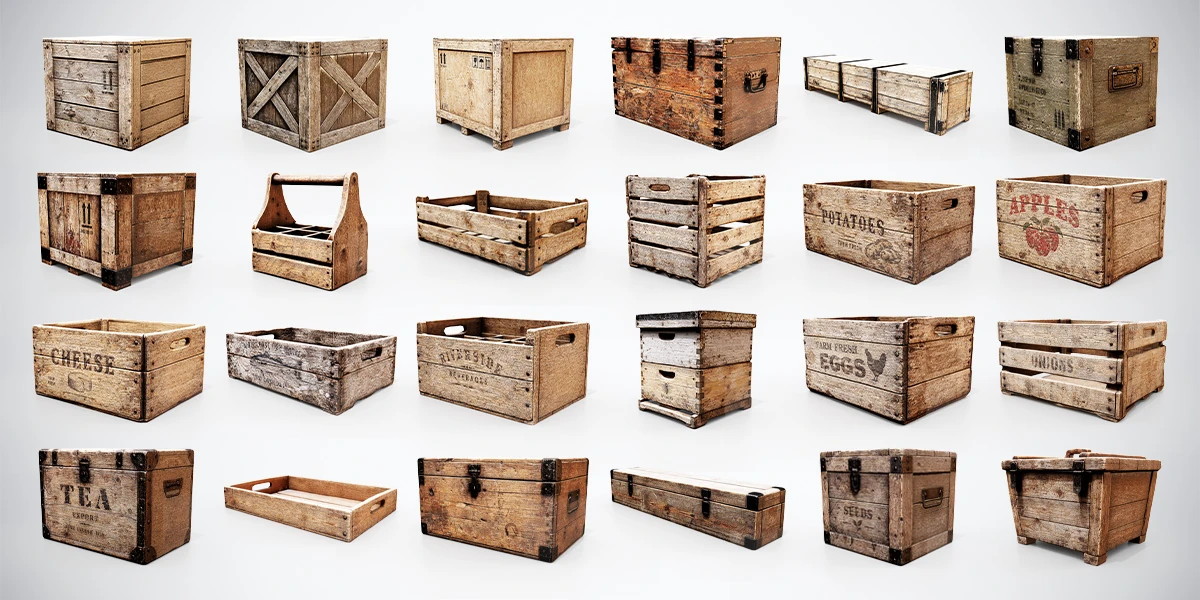
To reuse 3D props convincingly, vary the arrangement before making more assets. Viewers notice repeated silhouettes, spacing and distinctive marks. Changing the color of every copy often adds noise while leaving the underlying copy-and-paste pattern intact.
This workflow uses wooden containers as a practical example, but the same decisions apply to barrels, storage bins, furniture and workshop equipment. The goal is controlled reuse: a believable shared design language with enough variation to support the scene.
Find the repetition that is actually visible
Start at the final viewing distance. Take a screenshot and mark anything you recognize twice immediately: a tilted stack, a dark stain, an unusual handle or the same gap between two props. These repeated signals deserve attention before small texture details that disappear at normal play distance.
Separate three kinds of repetition. Shape repetition comes from the same outline. Arrangement repetition comes from reusing a complete group without changing its relationships. Surface repetition comes from distinctive texture features facing the viewer in the same way.
Do not remove repetition that explains the environment. A row of matching shipping containers can be appropriate because they belong to the same supply system. The asset-pack consistency guide explains why shared construction and material standards help a scene feel coherent. Preserve that coherence while correcting patterns that distract from it.
Sort your props into silhouette families
Make a small selection sheet or a neutral scene containing your candidate props. Ignore their names initially and compare the outlines: tall versus shallow, closed versus open, broad versus narrow. Two different files may still read as the same silhouette from your main camera.
The 24 Wooden Crates & Boxes bundle is a useful collection for this exercise because its containers include different proportions and constructions. Select a few large closed forms, a few open forms and one shallow or handled form. Those groups give you different composition roles without requiring unrelated prop styles.
Assign each selected model a job. Large containers establish storage masses; smaller forms connect them to activity; a tray can suggest something being handled nearby. Keep models in reserve instead of using every available variation in the opening view.
Check the family at thumbnail size. If two supposedly different choices are indistinguishable there, treat them as close alternatives, not as your main source of silhouette variety.
Create several arrangements from a small selection
Build three small groups before dressing the whole environment. One might be an aligned storage row, another a compact receiving stack, and the third a tray beside an accessible box. Keep the ingredients limited so you can judge how much variation comes from their relationships.
| Arrangement | Keep consistent | Change when reusing it |
|---|---|---|
| Stored supplies | Alignment and container family | Group length and an occasional empty position |
| Recent delivery | A compact footprint | Stack profile and which side faces the route |
| Active work area | Access to the working surface | Number and position of small containers |
Now place those groups in a room. Do not repeat the full arrangement at evenly spaced intervals. Change the gap between groups, leave some quieter stretches and allow the room’s architecture to interrupt the pattern.
The warehouse set-dressing exercise supplies a functional reason for these differences. Receiving, storage and picking areas should not all look like the same decorative cluster rotated through ninety degrees.
Duplicate deliberately in Blender
In Blender, Alt-D creates a linked duplicate: the objects share mesh data while their object transforms can differ. This is useful for placing copies of a static prop and keeping mesh edits shared. Editing the mesh on one linked copy affects the others that use that data, as described in the Blender linked-duplicate reference.
Use Shift-D when you need a separate mesh copy to edit independently. Do not assume this also creates independent materials: Blender’s default duplication behavior can retain shared material data. The duplicate reference distinguishes copied data from shared data. Before recoloring one copy, inspect its material assignment and make that material independent if the change must be unique.
Give your source objects clear names and keep an untouched reference outside the dressed area. Test one intended variation before duplicating it across the room. This makes it easier to catch a shared-data edit that changes more objects than expected.
Use a hierarchy of variation
Work from large changes to small ones. First change which silhouette appears in a group. Next change the group’s height, spacing and orientation. Only then consider material differences or additional marks.
Rotation should respect how the object is used. A container pushed against a wall may align with that wall; a recently handled tray may be offset. Giving every object a random angle makes the whole scene look equally disturbed, even when most of it represents organized storage.
Keep scale changes restrained and plausible. Stretching the same crate into several very different proportions also changes board thickness, hardware and texture appearance. It can create a visibly distorted family rather than convincing new models. Use genuinely different shapes when the scene needs a different container size, and check them against the consistent-scale workflow.
Avoid using mirrored text, reversed labels or conspicuously repeated damage as your variation strategy. Inspect all visible faces after a transform. A copy that looks different from the entrance may expose the exact same prominent mark when the player walks around it.
Vary materials only where the scene needs it
Decide what a material difference should explain. A replacement board, a different shipment or a more exposed storage position gives a variation a reason. Arbitrary hue changes on neighboring copies can weaken the impression that they belong to the same environment.
Start with a restrained shared material setup, then introduce a small number of intentional variants. If you create extra labels, decals or wear masks, check them at the final camera distance. A subtle difference that disappears there may add maintenance work without improving the scene.
Do not darken every duplicate to hide repeated texture marks. A large value change can become a stronger pattern than the original mark. Compare the scene in grayscale and remove variations that compete with the focal area.
When adjusting roughness or color, use a controlled PBR material test scene to distinguish the material change from a lighting change. Return to the production scene afterward: a variation must work under its actual lighting too.
Keep visual reuse separate from performance assumptions
Linked duplicates are an authoring choice, not a promise about the final renderer. Export and engine import settings determine how the resulting objects, meshes and materials are represented. Verify the imported result instead of assuming that Blender’s shared data guarantees a particular instancing or batching behavior.
Likewise, adding a unique material to every prop can have consequences that are invisible in a still image. Consult the draw-call guide for 3D artists and inspect your target engine’s profiler before choosing an optimization strategy. There is no universal number of variations that is correct for every project.
Keep a small record of each variation: its purpose, which data remains shared and where it is used. That record helps you remove accidental one-off copies without discarding deliberate storytelling details.
Run a repeat-pattern review
Review the environment from its entrance, its main interaction point and a reverse angle. At each position, ask which repeated signal you notice first. Correct that signal, then review again; do not change every copy at once.
Try a short exercise with six selected container models and three arrangement types. Build the scene once using evenly repeated groups, then revise only group size, gaps and orientation. Compare the two versions at the same camera settings. Add material variation only if the second version still exposes a distracting pattern.
Your stopping point is a scene where repetition supports the location and individual differences support its use. Some containers should look related. What matters is that the viewer understands the environment before noticing how many times you reused a file.