A dog can become a memorable part of a game scene: a companion beside the player, a resident of a village courtyard or a recognizable animal in a farm environment. Choosing the right model starts with what the player will see and what the character needs to do.
When I plan an asset for a scene, I find it useful to separate three decisions: shape, presentation and movement. A detailed coat cannot solve a silhouette that disappears behind the player, and a rig only becomes useful when you know which poses or actions you need. This guide turns those decisions into a practical shortlist for dog 3D models.
Start with the dog’s role and camera distance
Write one sentence describing the job of the asset. For example: “A dog follows the player through a village and remains recognizable from an elevated third-person camera.” That brief immediately gives you more useful criteria than choosing a breed from a close-up render.
For this example, inspect the back, ears and tail from above. Check whether the dog remains visible alongside the player’s legs and whether its coat separates from the ground. A portrait camera would create different priorities, including the muzzle, eyes and shoulder deformation during head turns.
| Intended use | Prioritize during selection | First scene test |
|---|---|---|
| Companion near the player | Readable outline, suitable proportions and planned motion | View beside the player at normal gameplay distance |
| Background village animal | Clear shape and convincing placement | Check the final camera composition at delivery resolution |
| Farm scene with several dogs | Meaningful variety in body shape and coat | Compare the animals together under one lighting setup |
| Close-up character interaction | Face readability and required deformation range | Review the expected head and body poses from the shot camera |
Treat these as production roles, rather than assumptions about a breed’s personality. The character’s behavior will come from your animation, audio and game design.
Compare silhouettes before coat detail
Begin with the model’s proportions: body length, shoulder height, ear direction, muzzle shape and tail profile. These features can remain readable when fine texture detail becomes small on screen.
Use a simple, neutral presentation to compare candidates. Keep the same camera, ground plane and lighting. Inspect a side view for body proportions, a front view for width and ears, and the actual gameplay view for the shape the player will encounter most often. A quick silhouette image is useful when coat markings distract from the outline.
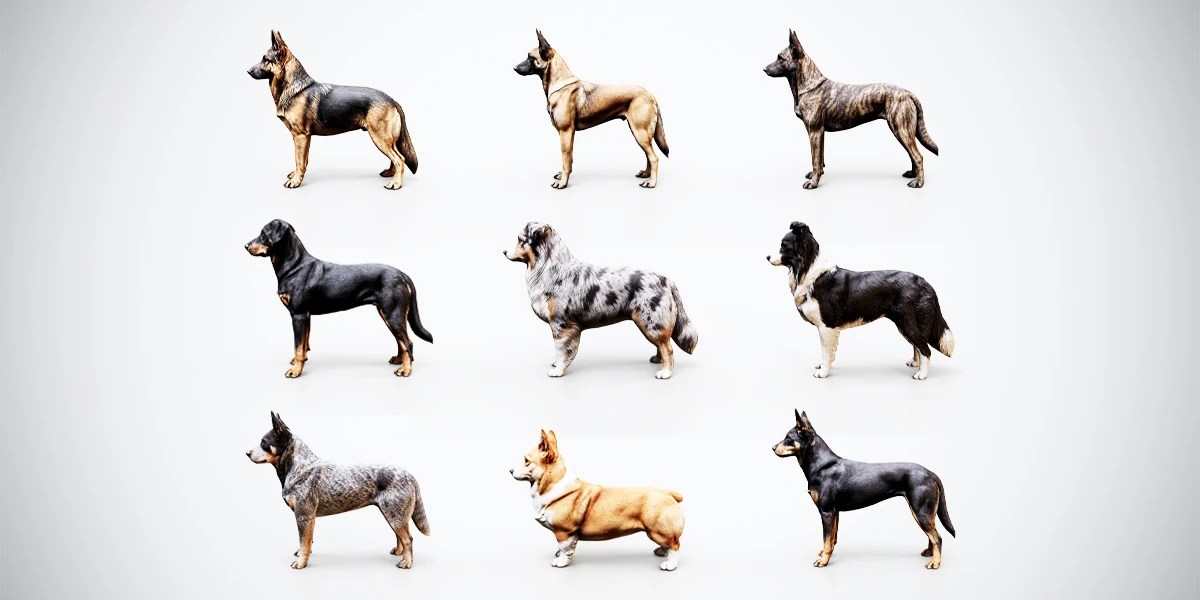
The 10 Rigged Shepherd & Herding Dogs bundle offers a concrete selection exercise. Its ten models represent nine breeds, including taller shepherd profiles, fuller-coated herders and two short-legged Pembroke Welsh Corgi variations. Compare the German Shepherd’s upright ears and elongated profile with a Corgi’s lower body and different tail shapes. The useful difference is the space each model occupies in your composition.
Do not judge every animal from a flattering three-quarter view alone. A tail can overlap the body from one angle, while ears that look distinct in a portrait may merge with background foliage from the game camera.
Test coat contrast in the intended environment
Once the shape works, bring back the materials. Compare the coat against the surfaces that will surround the animal: a pale stone path, dark soil, grass, timber or a shaded doorway.
For a village companion, try two representative locations, such as an open courtyard and a covered passage. Use the same exposure and material setup for each candidate. If you change the lighting for every dog, it becomes difficult to tell whether the improvement comes from the model or the presentation.
Black-and-tan markings, a fawn coat, brindle patterns and black-and-white patches can create different separations from the scene. Select the combination that remains legible in your project. Avoid brightening every dark coat simply to make it visible; composition, background choice and a more readable light direction may solve the problem while preserving the intended appearance.
Our guide to choosing game assets for a consistent visual style expands this comparison to the rest of an environment. Check the dog alongside your characters and props, not only against other dogs.
Choose static or rigged files for the actual task
A still background placement, a posed promotional render and an animated companion are different deliverables. Decide which one you need before organizing the source files.
The premium dog collection provides static and rigged BLEND and FBX versions. Its static BLEND files have packed textures, while the supplied PBR resources reach up to 4K and include Blender, Unity and Unreal presets. These options let you choose a starting file for scene assembly or character work without treating every use as an animation task.
A rigged version is appropriate when you need to change the pose or author movement. The collection does not include walk, run or idle clips, so allow time for the motions your project requires. For a scene with one resting animal, that may mean creating a suitable pose; a following companion needs a wider animation and gameplay plan.
Once you choose a rigged model, the Blender dog posing guide provides a focused review of paw contact, body balance and joint deformation. For an engine destination, continue with the Unity Generic rig import workflow.
Check scale and clearance with scene references
Place the dog beside a known reference from your project, such as the player character, a doorway or a bench. Decide on its intended size and compare all candidates using that convention. Enlarging one model until it fills the same screen area as another can hide meaningful differences in their proportions.
For a companion, examine the space between its body and the player. For a courtyard animal, check the height of nearby steps, fences and furniture. If interaction is planned, include a rough target for the player’s hand or the object the dog approaches. These simple references reveal integration work before you commit to a detailed shot.
Record the chosen dimensions so that the Blender scene and engine scene can be compared later. The asset scale consistency guide explains how to carry that reference through the wider pipeline.
The free rigged German Shepherd model lets you explore the black-and-tan appearance, overall composition and your own poses. It includes static and rigged versions in both BLEND and FBX, textures packed into both BLEND files, and 2K textures with Blender and PBR Metallic-Roughness presets. Choose the static file for initial scene placement or the rigged version when a pose is part of your selection test.
Build variety around meaningful differences
If the project needs several dogs, give each one a reason to be in the shortlist. A taller upright-eared outline, a fuller coat and a low, compact body can serve different compositions. Several nearly identical placements may add less visual variety than two clearly different profiles.
For example, a proposed village scene might use one taller dog beside a character and a compact model near a bench. Test both against the same environment before expanding the cast. This is a composition exercise, not a requirement to use every model in a pack.
The single models versus bundles comparison helps assess the wider purchase decision. Here, the useful question is specific: which dog shapes support the scenes you have actually planned?
Save a short selection record
For each shortlisted model, keep a gameplay-view screenshot and a few practical notes:
- Intended scene role and camera distance.
- Chosen size beside the project reference.
- Silhouette and coat readability in two representative locations.
- Required poses or animations and the source file you will use.
- Remaining checks for materials, deformation and engine integration.
Choose the model that satisfies those needs with a clear production path. That makes the dog part of the scene’s design from the beginning, with its appearance and movement supporting the experience you want to build.