
HDRI Lighting for Product Turntables in Blender
Light a product turntable in Blender with an HDRI. Check the full rotation, control moving reflections and keep exposure consistent before rendering the loop.
Read article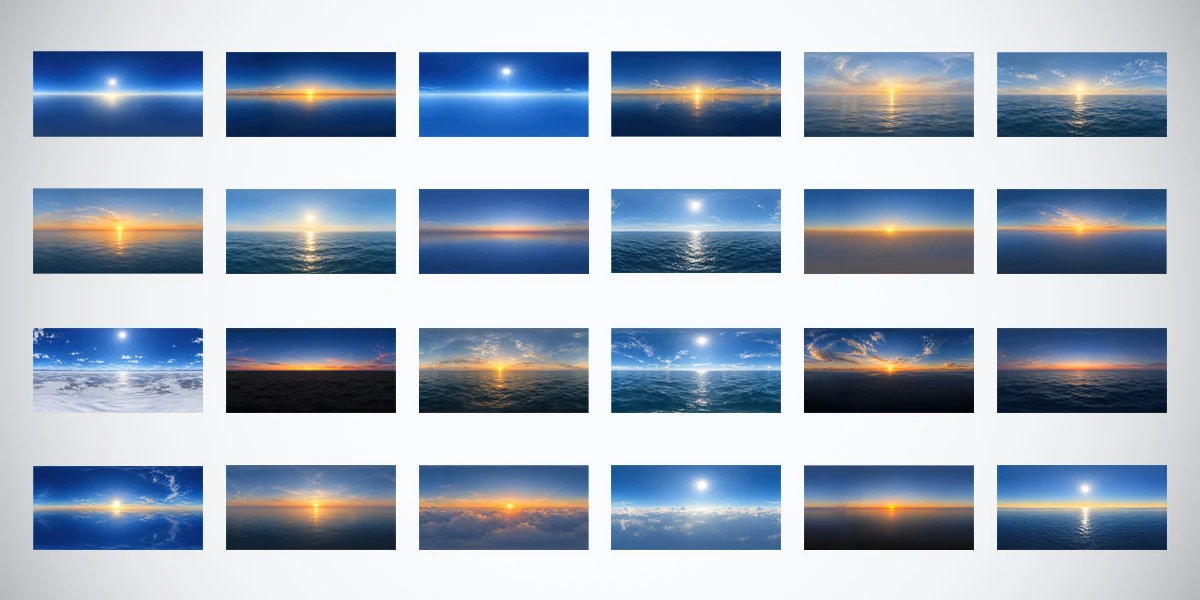
Open the image to explore the details.
Explore 24 unclipped sky and ocean HDRIs in 10K, 4K and 2K. Use 32-bit HDR environments for daylight, sunset lighting and reflections in your 3D renders.
See current pricing, available files and license details on the marketplace.
Compare outdoor lighting moods with 24 unclipped sky and ocean HDRIs, each supplied in 10K, 4K and 2K. The collection moves from clear blue daylight to warm low suns, twilight bands, marine haze and views above cloud decks. Every environment is provided in 32-bit .HDR format with a 360° equirectangular layout.
Use the pack to explore how a sky’s color, sun position and horizon shapes affect the presentation of a product or 3D asset. The panoramas are AI-assisted and manually refined, with their primary role being environment lighting and reflections. The cover shows all 24 previews; it is a browsing reference, not a substitute for the downloadable HDR lighting files.
.HDR files in a 360° equirectangular, 2:1 projection.These are environment image assets. Import, environment rotation, intensity and exposure need to be configured in your chosen renderer. The advertised specifications do not imply an included Blender scene, Unity package or Unreal project.
For a clean starting comparison, shortlist a clear daylight map and a warm low-sun map. Keep the object, camera and material fixed, then rotate each environment to see where its brightest region appears on the surface. A wide ocean horizon and a cloud-filled sky can produce very different reflected shapes even when their overall colors seem similar.
The outdoor HDRI selection guide explains how to separate sun direction, sky coverage and reflected surroundings. Use it to decide whether a particular panorama supports the silhouette or competes with the subject. The preview’s appearance alone cannot quantify the illumination in the HDR file.
For land-based surroundings with fields and roads, compare the 20 Rural Fields HDRI Pack. It offers a different environment theme; it is a separate collection with its own package specifications.
Read the cover from left to right, one row at a time. The descriptive labels below follow the supplied preview order, 01–24; they are not a claim about filenames inside the download.
Deep Blue Clear Sky with Bright Sun. An intense blue daylight sky with a luminous sun and a clean, reflective horizon.
Golden Sunrise Over a Calm Horizon. A low amber sun transitioning from warm horizon colors into deep blue sky.
High Sun in a Saturated Blue Sky. Clear, vivid blue daylight with a prominent sun, minimal clouds, and a luminous marine horizon.
Warm Sunset Over Reflective Ocean. Golden sunlight, scattered distant clouds, and bright reflections across the sea.
Soft Golden Seascape with Thin Clouds. A gentle sun glow with delicate cloud textures and a softly illuminated ocean.
Sunlit Ocean with Wispy High Clouds. Feathered cloud formations, clear blue tones, and warm reflections on open water.
Orange Sunset Over Gentle Ocean Waves. Low golden-orange sunlight beneath small clouds and a softly rippling sea.
Soft Sunlight Over Textured Blue Water. Pale warm sunlight breaks through a softly hazy sky and reflects on textured ocean water.
Pastel Pink Twilight at the Horizon. A still, reflective horizon with a pink-orange twilight band fading into deep blue.
Crisp Daylight Above Deep Blue Waves. A bright daytime sun over open water, with sparkling highlights and thin clouds.
Muted Sunrise with a Hazy Horizon. A low sun and a soft golden-to-blue gradient above a subdued, hazy horizon.
Golden Low Sun Under Feathered Clouds. A warm sun close to the horizon, framed by light cloud streaks.
Bright Sun Above a White Cloud Layer. Brilliant daylight over a broad white cloud deck and a vivid blue sky.
Red-Orange Dusk Above Dark Water. Warm pink and orange twilight clouds contrasting with a darker marine horizon.
Amber Sunset Under Layered Clouds. An open-ocean golden hour scene with broken clouds and warm sea reflections.
Blue-Sky Daylight with Scattered Cirrus. A high bright sun, delicate cloud streaks, and a richly textured ocean.
Dramatic Streaked Sunset Clouds. Radiating high clouds and vivid warm light above a dark blue seascape.
Coral Twilight Above the Evening Sea. A glowing coral horizon fading into deep blue over gently moving water.
Bright Blue Sky with Mirrorlike Reflections. A clear sun and sweeping cloud streaks mirrored across a smooth, luminous blue horizon.
Soft Sunset with Gentle Marine Haze. Warm low sunlight, thin atmospheric clouds, and subdued ocean reflections.
Golden Sunrise Above Puffy Cloud Tops. A low glowing sun rising over a dense, softly illuminated cloud layer.
Clear Daylight Over a Cloud Deck. A bright white sun illuminating expansive clouds beneath an open blue sky.
Warm Sun Near a Reflective Horizon. A low golden sun spreads warm light along a quiet horizon beneath a deepening blue sky.
Pale High Sun Over the Open Sea. A bright lightly hazy sky, calm blue water, and long sunlight reflections.
Start a lighting study with one of these free environments, then compare the wider collection if you need more sky and ocean variations:
Each free landing page provides its direct ZIP download and CC BY 4.0 attribution guidance. The full bundle’s resolution options, file specifications and commercial licence are separate from those free downloads.
Begin with a smaller supplied version for a lighting comparison, then inspect the regions that matter at the final output size. A close reflection on smooth metal can reveal different detail from broad illumination on a rough surface. Compare the same environment at 2K, 4K and 10K before deciding whether the larger version improves your shot.
The HDRI resolution guide explains the comparison method and the distinction between spatial detail and dynamic range. This bundle’s actual supplied sizes are 2K, 4K and 10K; the guide’s other examples do not add 8K or 12K files to this pack. A higher resolution is not a guarantee of better lighting, and “unclipped” does not specify a universal exposure setting.
In Blender, load the purchased .HDR panorama into an Environment Texture in the World shader, using equirectangular projection. Follow the Blender HDRI product-lighting workflow to establish the connections, rotate the environment and keep exposure decisions separate from material changes.
Compatible Unity, Unreal Engine and other renderers can use HDR environment images in their supported sky or reflection workflows. Import settings and lighting configuration vary by application and render pipeline. Inspect the result in the destination renderer before using it as a material reference.
If the scene needs a carefully placed highlight, the HDRI and area-light comparison helps decide when a local light can complement an environment. For an object resting on a surface, use the HDRI ground-plane workflow to plan contact geometry instead of expecting the panorama to supply a physical floor.
Use a focused lighting exercise to decide which sky belongs in your next project:
These guides describe setups you build in your own scene. The bundle supplies HDRI environment files rather than ready-made Blender scenes or animated lighting rigs.
The environments were initially generated with AI and then refined manually through exposure correction, unclipped optimization and seamless-edge work. They provide varied lighting atmospheres and reflected surroundings; some visible details may be less defined than in traditionally captured or rendered environments.
Use them primarily for environment lighting, reflections and look development. When the camera needs a detailed standalone backdrop or nearby scenery, choose or build suitable background elements and inspect the visible panorama at delivery size. Ocean waves and cloud layers in these files are image content, not animated geometry or weather systems.
Browse the individual HDRI collection for other environment themes, or open the Superhive listing for current package details, pricing and license terms.
Light a product turntable in Blender with an HDRI. Check the full rotation, control moving reflections and keep exposure consistent before rendering the loop.
Read articleBuild golden hour product lighting in Blender with a low-sun HDRI. Control warm color, preserve readable shadows and compare your result with a neutral reference.
Read articleKeep HDRI lighting and reflections while using a different background in Blender Cycles. Connect Light Path and Mix Shader nodes and check common mistakes.
Read article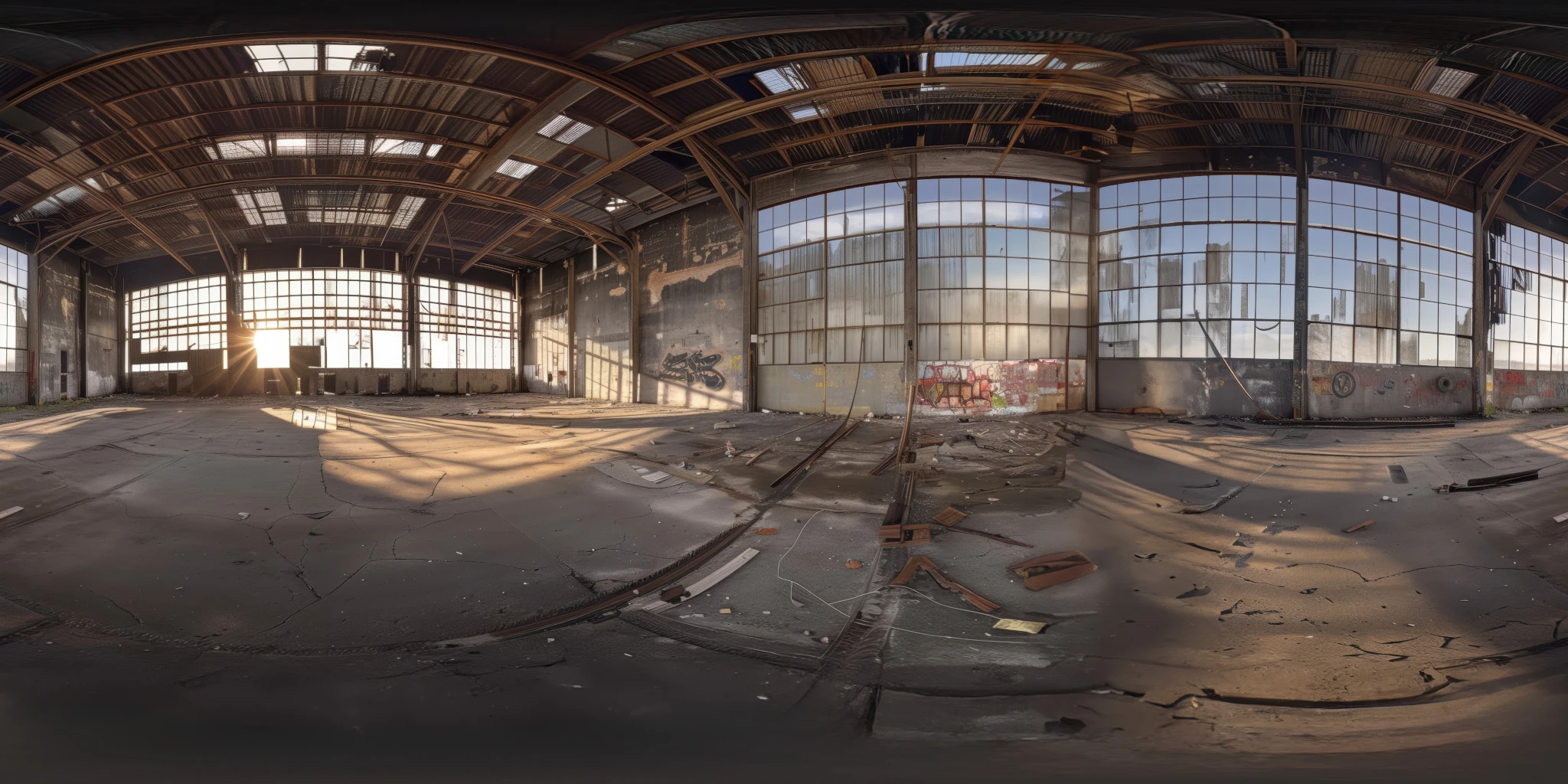
Explore an abandoned warehouse HDRI with window light, roof trusses and worn concrete. Choose 12K to 2K unclipped maps for industrial props and reflections.
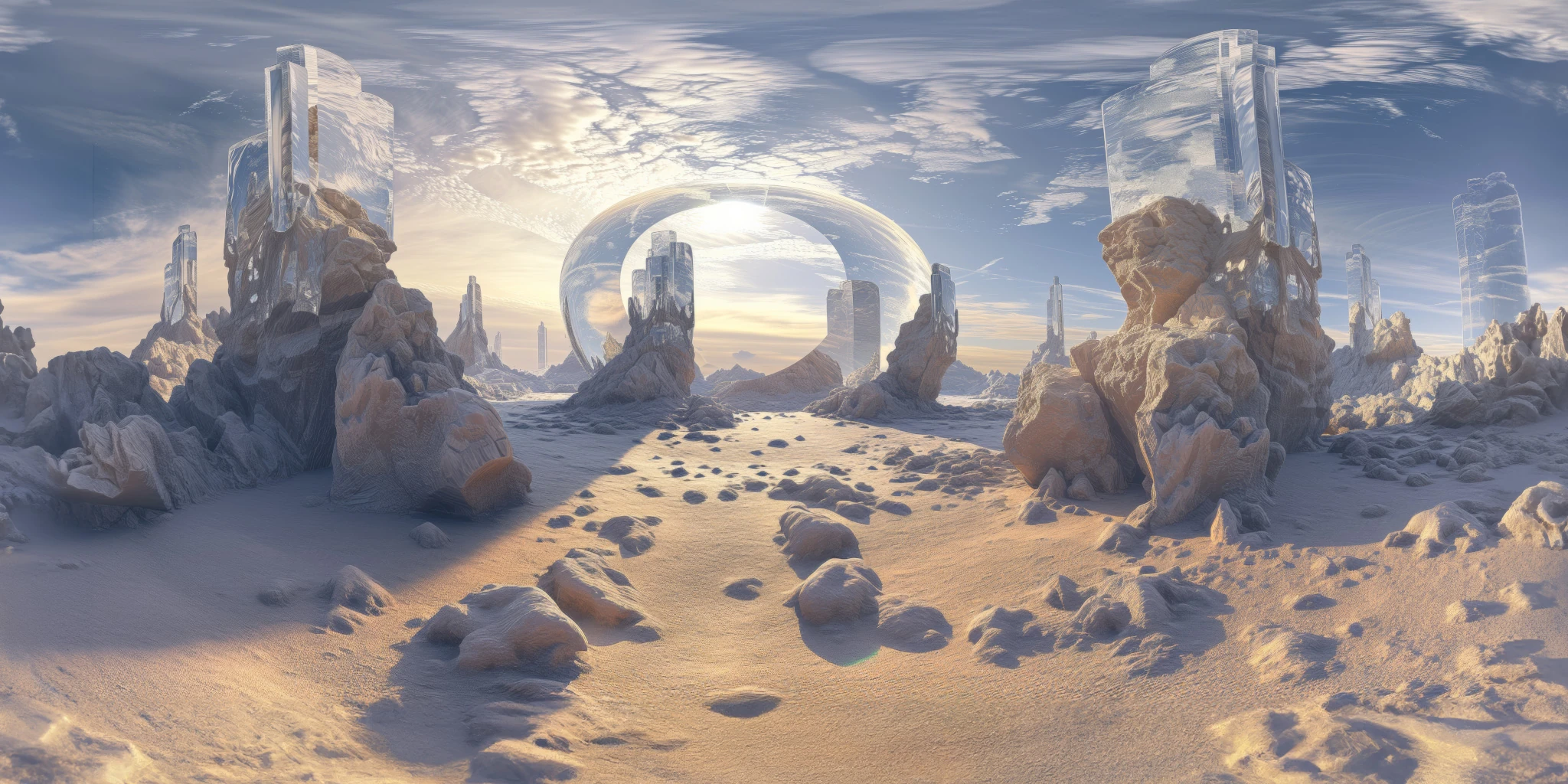
Explore a crystal valley HDRI with pale formations, sandy terrain and a monumental arch. Choose 12K to 2K maps for bright sci-fi lighting and reflections.
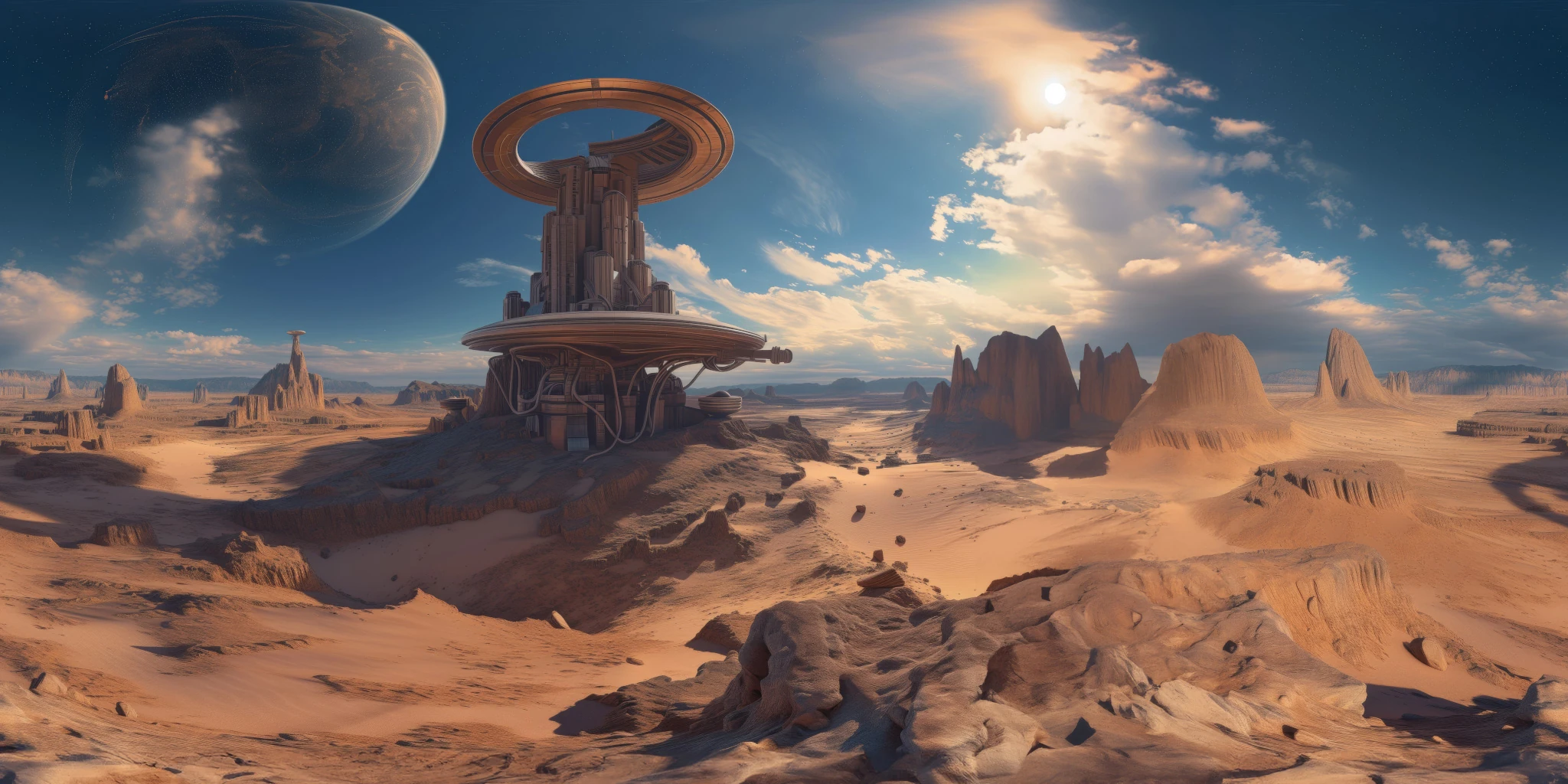
Explore a sci-fi desert HDRI with a ring-shaped tower, orange rocks and a distant planet. Compare 12K to 2K maps for warm alien lighting and reflections.